
Where your steps live
| iPhone | Android | |
|---|---|---|
| Where steps are stored | Apple Health | Health Connect |
| What puts them there | The iPhone itself, Apple Watch, and apps you allow | Fitness apps and watch apps you allow, for example Samsung Health and Fitbit |
| How an app gets access | You allow it to read Steps in the Health permissions | You allow it to read Steps in Health Connect |
| If phone and watch both count a walk | Health uses the source at the top of its data sources list | Health Connect uses the app at the top of "Data sources and priority" |
Health Connect is part of Android 14 and later, and an app from Google Play on older versions. In both systems an app only sees what you allow, and you can take the permission back at any time.
What the built-in options can and can't do
| Option | Who can join | Group size | What it scores |
|---|---|---|---|
| Apple Watch competition | Apple Watch owners only | Two people | Activity ring points over 7 days, not steps |
| Fitbit challenges | Removed from the Fitbit app on 27 March 2023 | ||
| Group chat screenshots | Anyone | Any | Whatever people post; honor system |
| Cross-platform challenge app | Anyone with the app | Depends on the app | Steps read from Apple Health and Health Connect |
Sources: Apple Watch User Guide, 9to5Google, 27 March 2023. Checked 23 November 2026.
What to look for in a cross-platform step challenge app
- Reads both stores. Apple Health on iPhone and Health Connect on Android, so nobody types steps in.
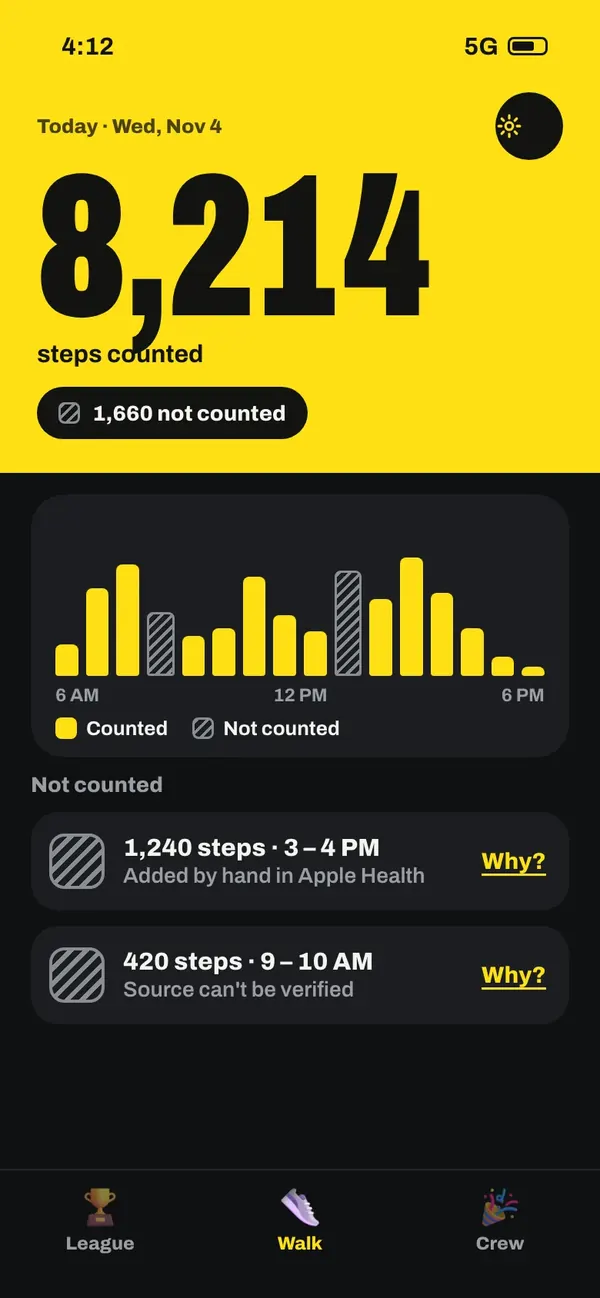
- Ignores hand-entered steps. Both stores mark steps that were typed in by hand. A fair app leaves them out.
- One finish line for the group. The week should close at the same moment for everyone, in one time zone.
- Room for late syncs. Watches can sync hours after the walk. A grace period stops arguments.
- Free for the basics. Your friends shouldn't have to pay just to join your group.
- Reads only what it needs. A step challenge needs your step count. Check the permission screen and the privacy policy for anything more.
Set-up so everyone's steps count
On iPhone
- Install the challenge app and allow it to read Steps when it asks.
- If you wear an Apple Watch, steps reach Apple Health automatically.
- Changed your mind? In the Health app, tap your profile picture, then Apps under Privacy, then the app's name.
On Android
- Make sure the app or watch that counts your steps writes them to Health Connect. In Samsung Health and Fitbit this is a Health Connect switch in their settings.
- Install the challenge app and allow it to read Steps in Health Connect.
- If two apps count the same walk, set the one you trust most at the top of Health Connect > Data sources and priority.
- Open your watch's app before the deadline so the last steps sync.
Running your first one? How to start a step challenge covers rules and scoring, and the January walking challenge plan gives you four ready-made weeks.
Hotfoot on Android and iPhone
- Android: free from December 15. Hotfoot reads only your step count from Health Connect.
- iPhone: coming soon, with steps from Apple Health. Friends on iPhone will join the same crews and leagues as friends on Android. Until it is out, a crew can only include Android users.
- Hand-entered steps don't count, on either platform.
- The week closes Sunday at 11:59 PM in your crew's time zone, and late syncs count until Monday noon.
- Your steps are never sold and never used for ads.
Questions
Can iPhone and Android users do a step challenge together?
Yes, with an app that runs on both and reads Apple Health on iPhone and Health Connect on Android. The built-in options on each platform only compare people on the same platform.
Can I compete with an Apple Watch against a friend on Android?
Not with Apple's built-in competition, which needs an Apple Watch on both sides. A third-party app can read your Apple Watch steps from Apple Health on your iPhone and compare them with your friend's steps from Health Connect.
Does Hotfoot work on iPhone?
Not yet. Hotfoot comes to Android on December 15, and the iPhone version is coming soon. It will join the same crews and leagues.
Do steps from my Galaxy Watch or Fitbit count?
If Samsung Health or the Fitbit app writes your steps to Health Connect, Hotfoot can read them. Check the Health Connect switch in that app's settings.
Will my steps be counted twice if I wear a watch?
It shouldn't be. When your phone and watch both count the same walk, Apple Health and Health Connect count it once in your daily total, using the source you put first.